For architects who sell plans

The sale is the easy part.

Unrolled handles everything after it. Every buyer gets a project with their stamped plans, updates and answers. AI does the routine work; your team makes the calls.

  • Works with your Shopify checkout
  • Your own instance and database, run by us
  • From $2,000 a month. See pricing
The buyer’s projectCustomer view
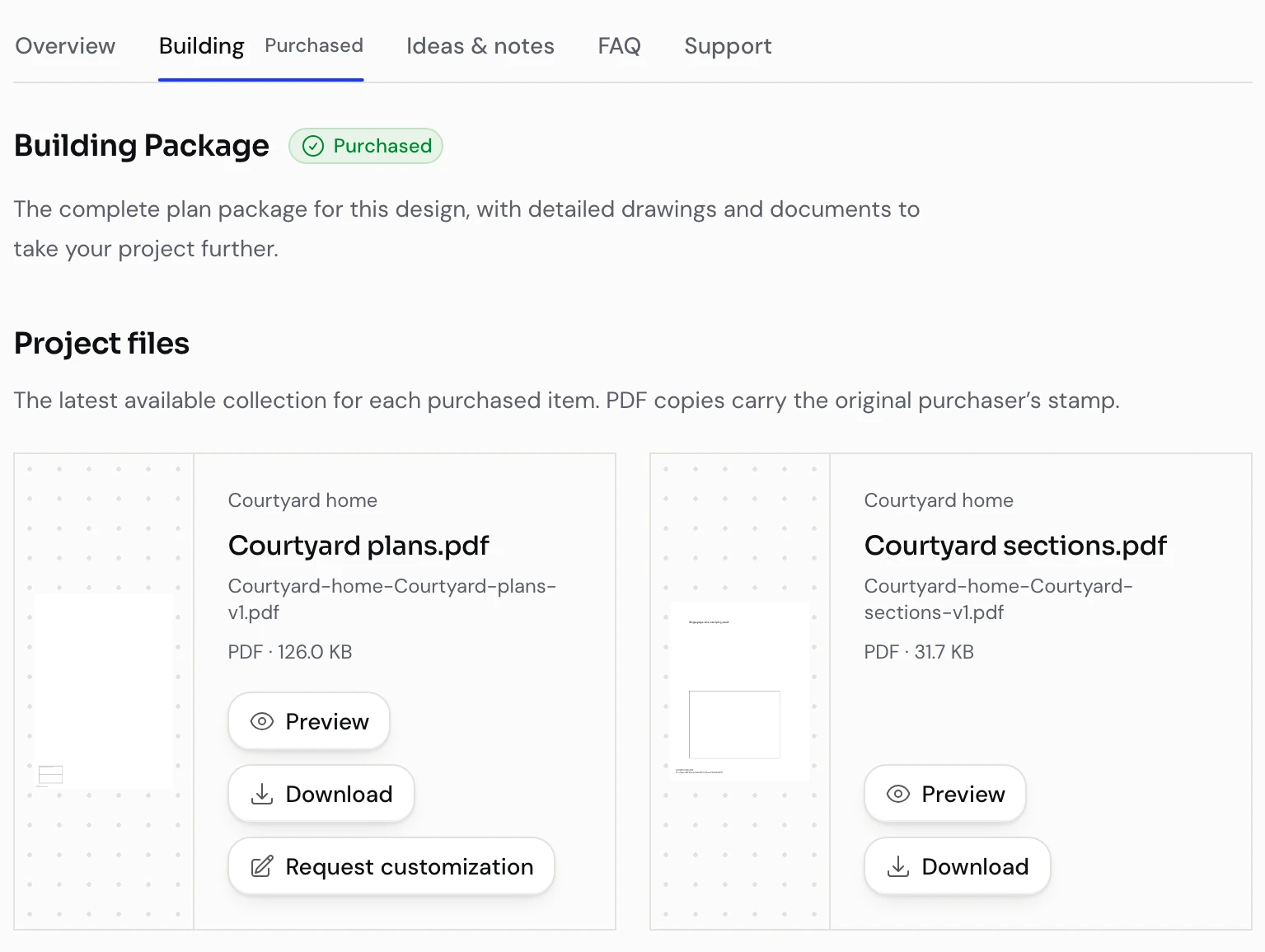
Building Package in the customer’s project with two purchaser-stamped PDF files, each with preview, download and request-customization actions.
Their files, stamped for them, ready to preview or download.

Real product screens. Demo projects and data.

How it works

Keep your checkout. Give every buyer a project.

The purchase stays in your store. The moment it’s paid, Unrolled opens a project for that buyer and keeps everything that follows in one place, from the first download to the last question.

We set up and check the Shopify connection with you. Other stores are scoped separately.

  1. They buy a plan

    In your existing store. Nothing changes at checkout.

  2. Their project opens

    With the package they bought and PDFs stamped for them.

  3. Everything after lands there

    Updates, questions and custom requests. Your team and the AI answer in the same place.

Plans and updates

Publish once. Every buyer gets their own copy.

Upload the revised sheets, review what changed and choose who receives the release. Unrolled stamps a PDF for each purchaser and puts it in their project.

  • Send the update to earlier buyers, or to new purchases only
  • Every PDF carries the purchaser’s email and order reference
  • Drafts stay private until you publish
See where the stamp goes
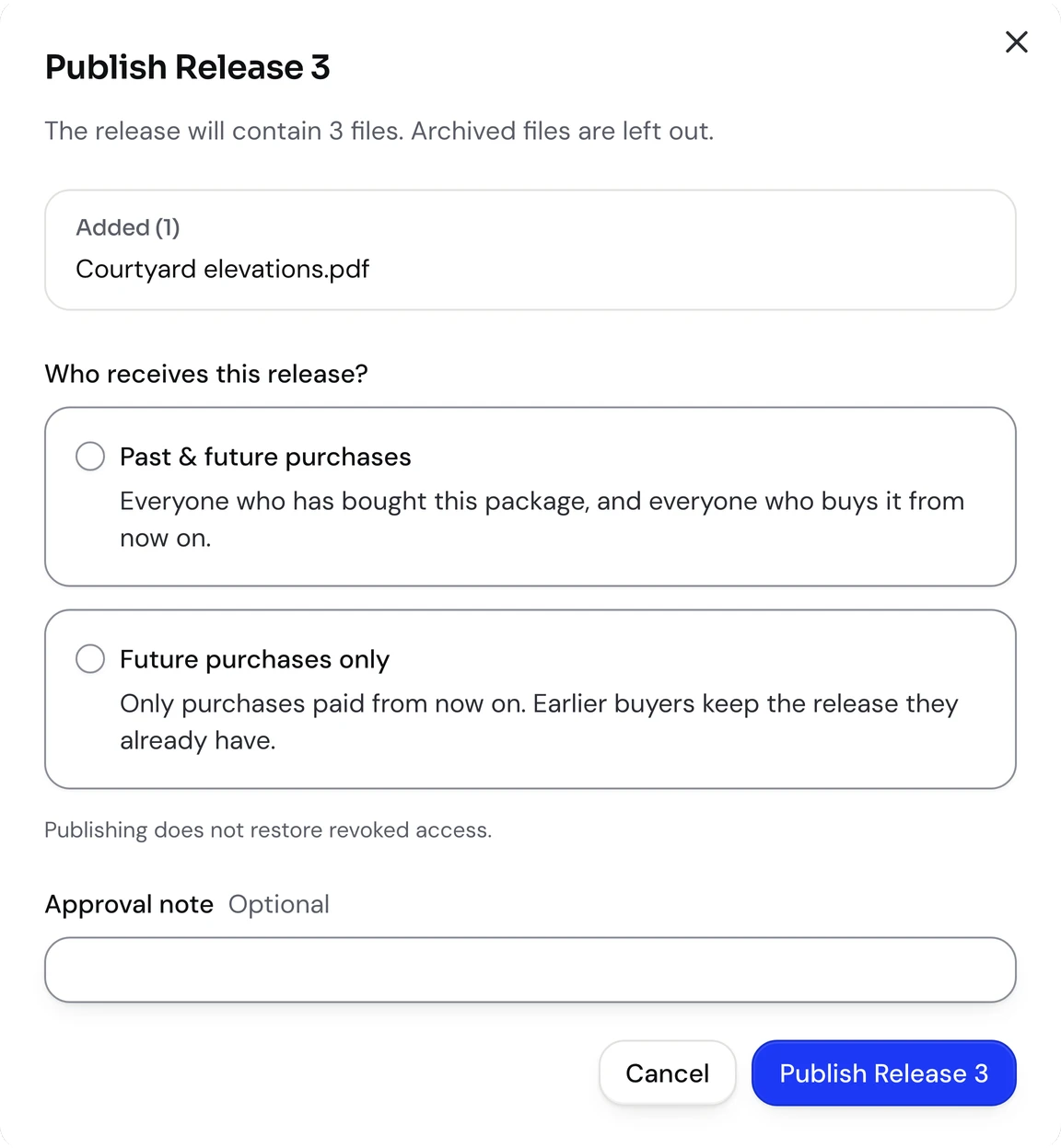
Publish release dialog listing an added file and the choice between past and future purchases or future purchases only.
Review the changes. Choose who gets the release.
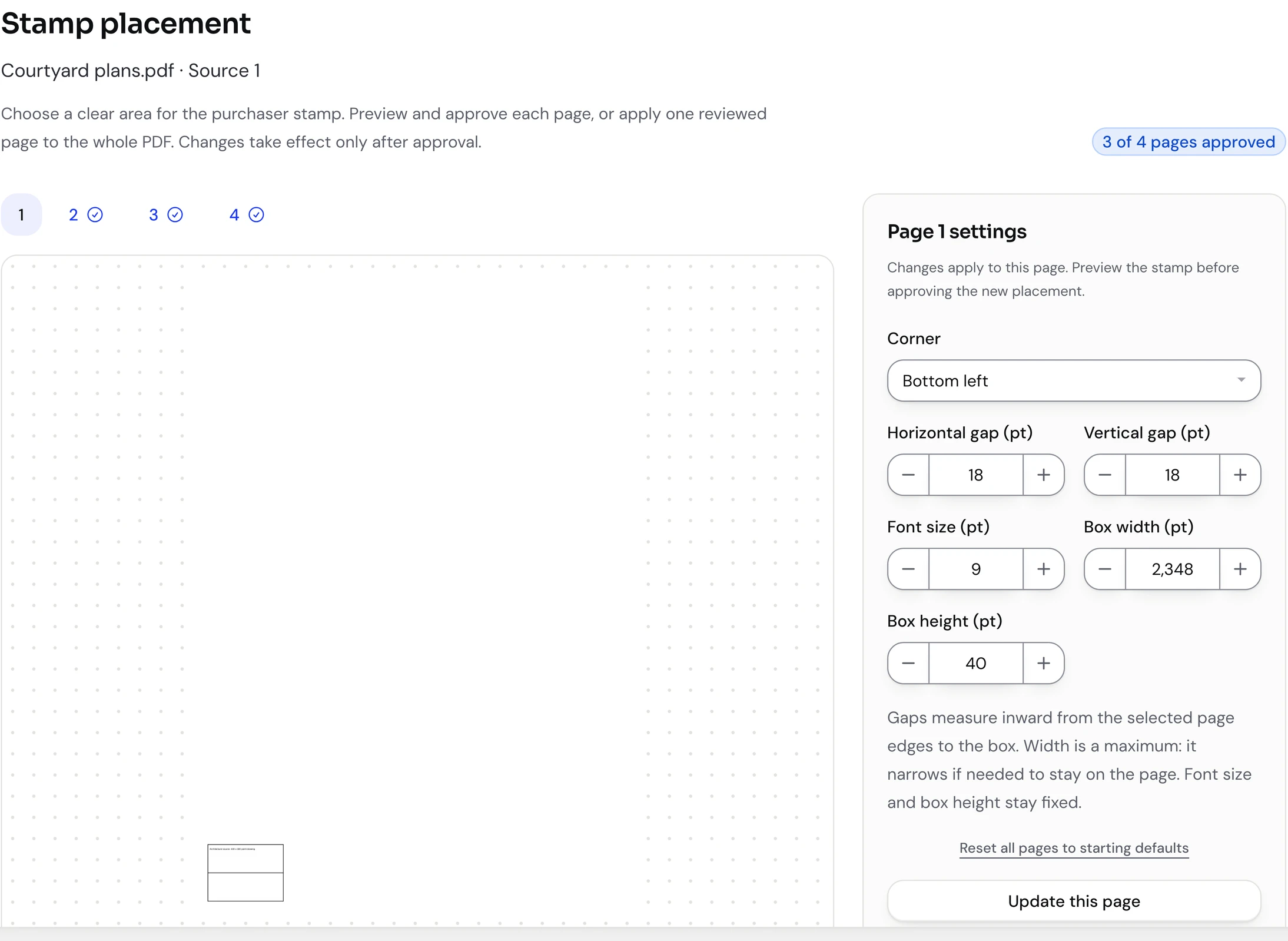
Where does the purchaser stamp go?

Preview the stamp on the actual page, set the corner and the gap from the edge, and approve it. The drawing keeps its vector content and geometry. Non-PDF files are delivered unchanged.

Stamp placement screen with a PDF page preview, the purchaser stamp in a corner, and controls for corner, edge gaps, font size and box size.
Approve the placement before purchaser copies go out.

Sharing

Share the project. Choose what each person sees.

A house is never built by one person. Buyers invite their partner, family or builder by email, and decide for each of them whether they can download and edit, or only look.

  • Every download carries the original buyer’s stamp, whoever makes it
  • Each conversation has its own participants. Owning the project doesn’t open every thread
  • On prefab projects, your team invites builders and suppliers, who see only the tasks you share with them
  • Removing someone takes effect straight away, even in an open session

Who sees what on a plan project

OwnerThe buyerEditorPartner, builderViewerFamily, friends
Preview the plans
Download stamped PDFs
Add and edit project notes
See purchase detailsThe original buyer only
Invite, change or remove people
ConversationsOnly the ones they’re added to

AI-native

Routine work, handled. Judgement, yours.

Unrolled was built around AI from the start, not fitted with a chatbot later. It works from the same projects, files and knowledge as your team, and it shows up wherever there’s routine work: in support, in project management and in the moment a buyer is ready for more.

For your customers

It answers the questions you’ve answered before.

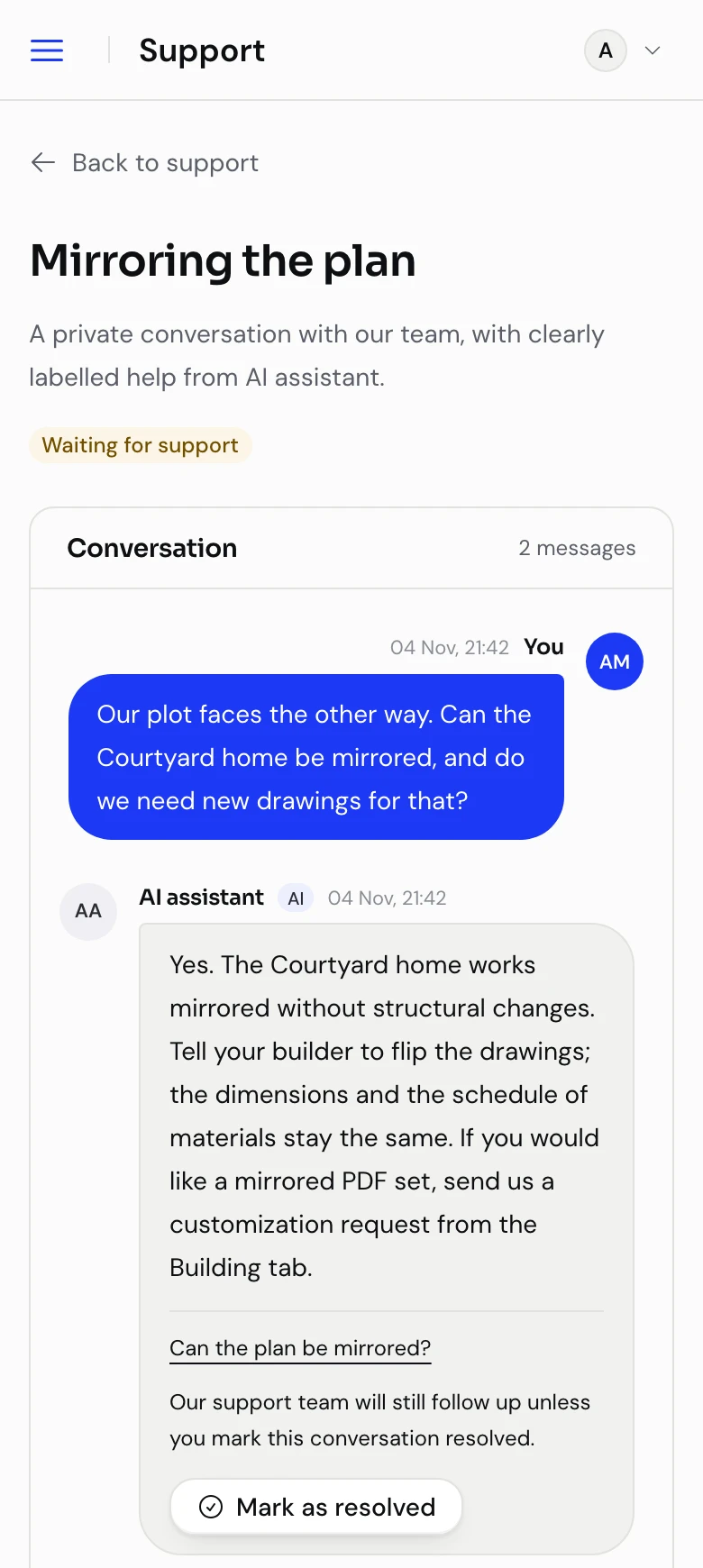
When a buyer asks something your FAQ or their project already covers, the AI replies in the conversation, labelled, with its source. If it isn’t sure, it stays quiet and leaves the question with your team.

Customer support conversation on a phone: the buyer asks whether the plan can be mirrored and a labelled AI assistant reply answers from the plan FAQ, with a source link and a note that the support team will still follow up.
Labelled, sourced, and pausable by the customer.
For your team

It reads every thread so you don’t have to.

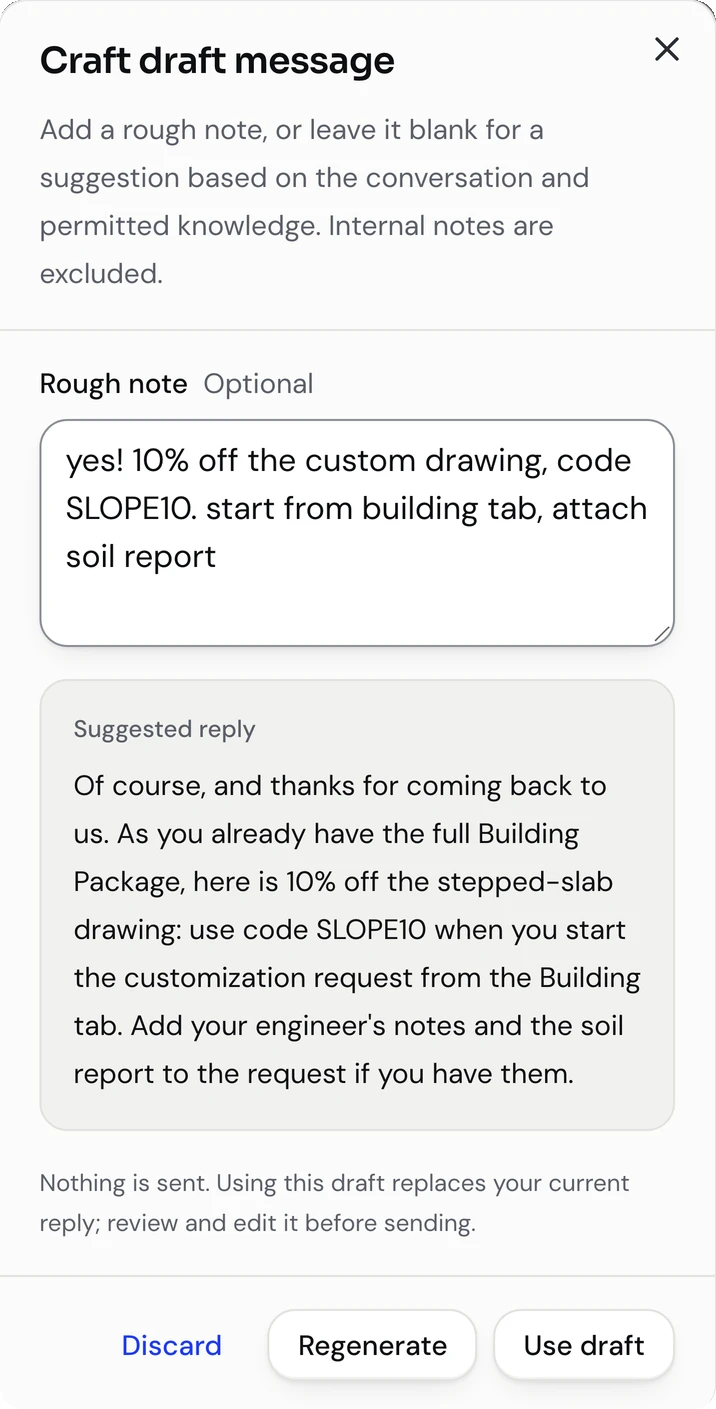
Each conversation gets a running summary. When it’s your turn to answer, type a few words, like “10% off, code SLOPE10”, and the AI turns them into a short, well-worded reply. You edit it. You send it.

Staff drafting dialog on a phone: a rough note offering 10% off with code SLOPE10 becomes a short, polished reply to the customer, ready to edit before sending.
A draft to review. Sending stays a human action.
For prefab projects

It keeps the build moving.

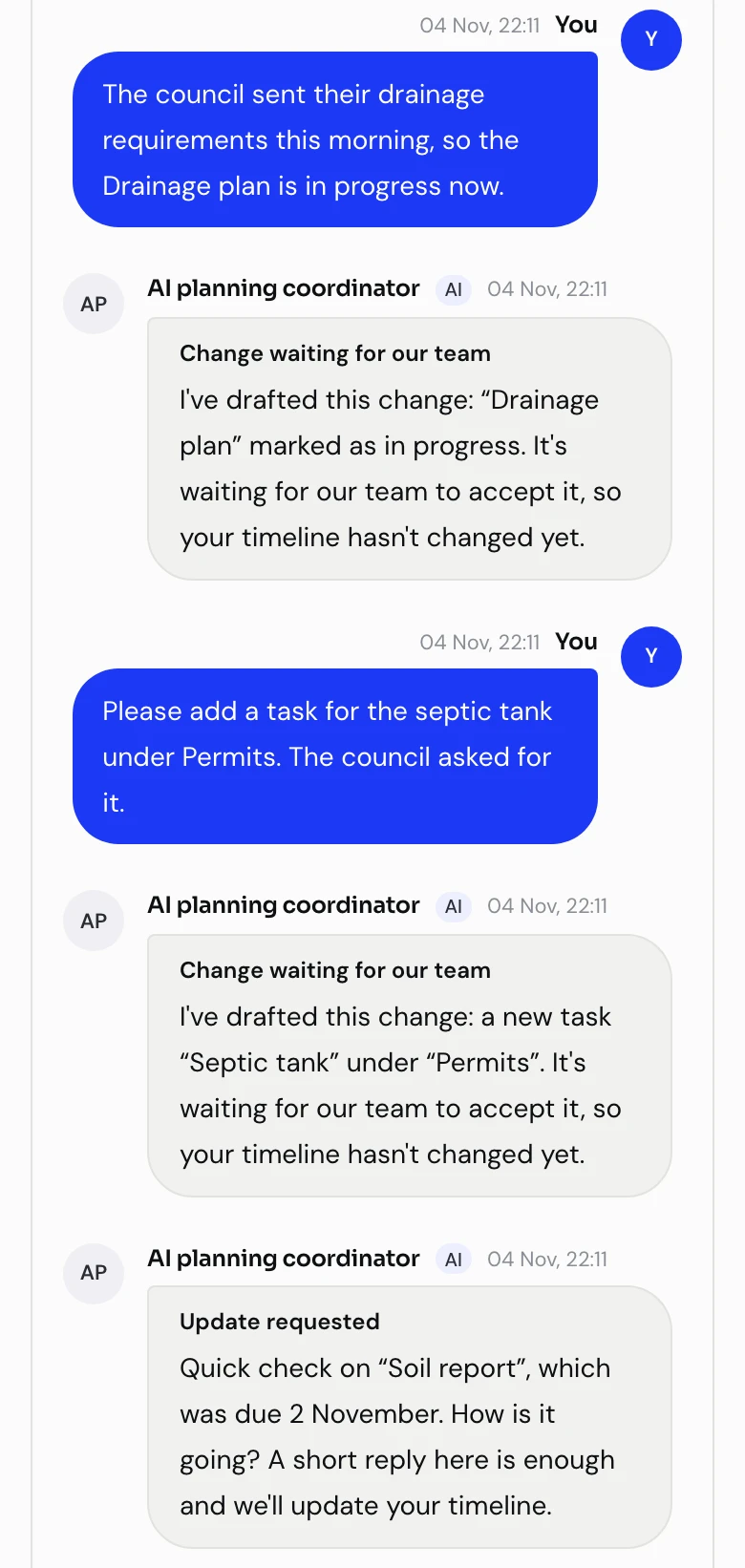
The coordinator proposes the timeline, records progress that customers and builders report in conversation, asks for updates when work goes quiet, and brings anything uncertain to your team to decide.

Prefab planning conversation on a phone: the coordinator turns a progress report and a request for a septic tank task into named changes waiting for staff, then asks for an update on an overdue soil report.
It names each change it drafts, and asks when work goes quiet.
For your sales

It suggests the next design when it fits.

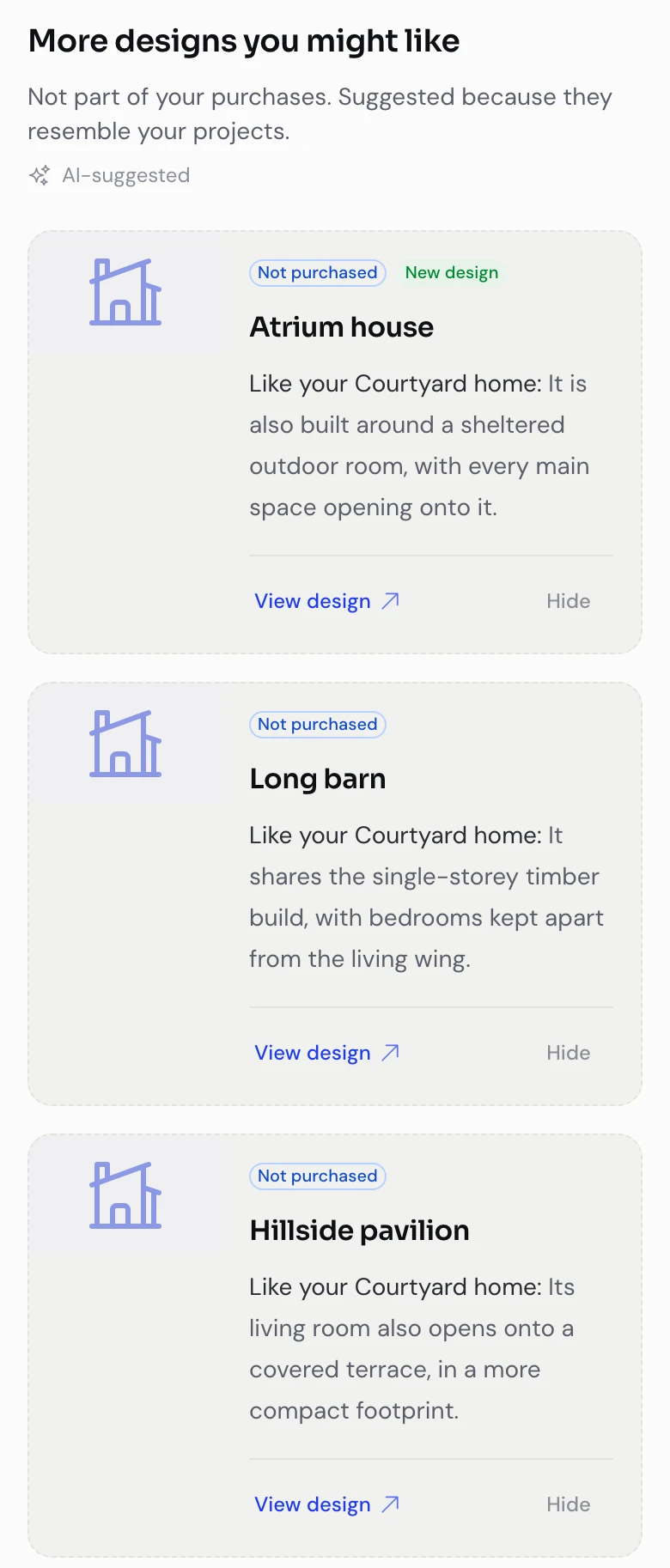
On a buyer’s projects page, it picks designs from your catalog that resemble the ones they own, and says why. When your rule says it’s time to offer the Building package to a buyer who opted in, it writes the personal note. Who gets an offer, and at what price, stays your call.

Customer projects page on a phone: under More designs you might like, three unpurchased catalog designs, each with a short AI-written reason it resembles the customer’s Courtyard home, a View design link and a Hide button.
Each suggestion says why it fits. Buyers can hide it.

What it never does

  • Approve a refund or change a purchase
  • Give design or structural advice beyond your published knowledge
  • Reply when it isn’t confident
  • Send a reply it drafted for your team
  • Decide who gets an offer, or what it costs

Customer support

Questions land beside the project.

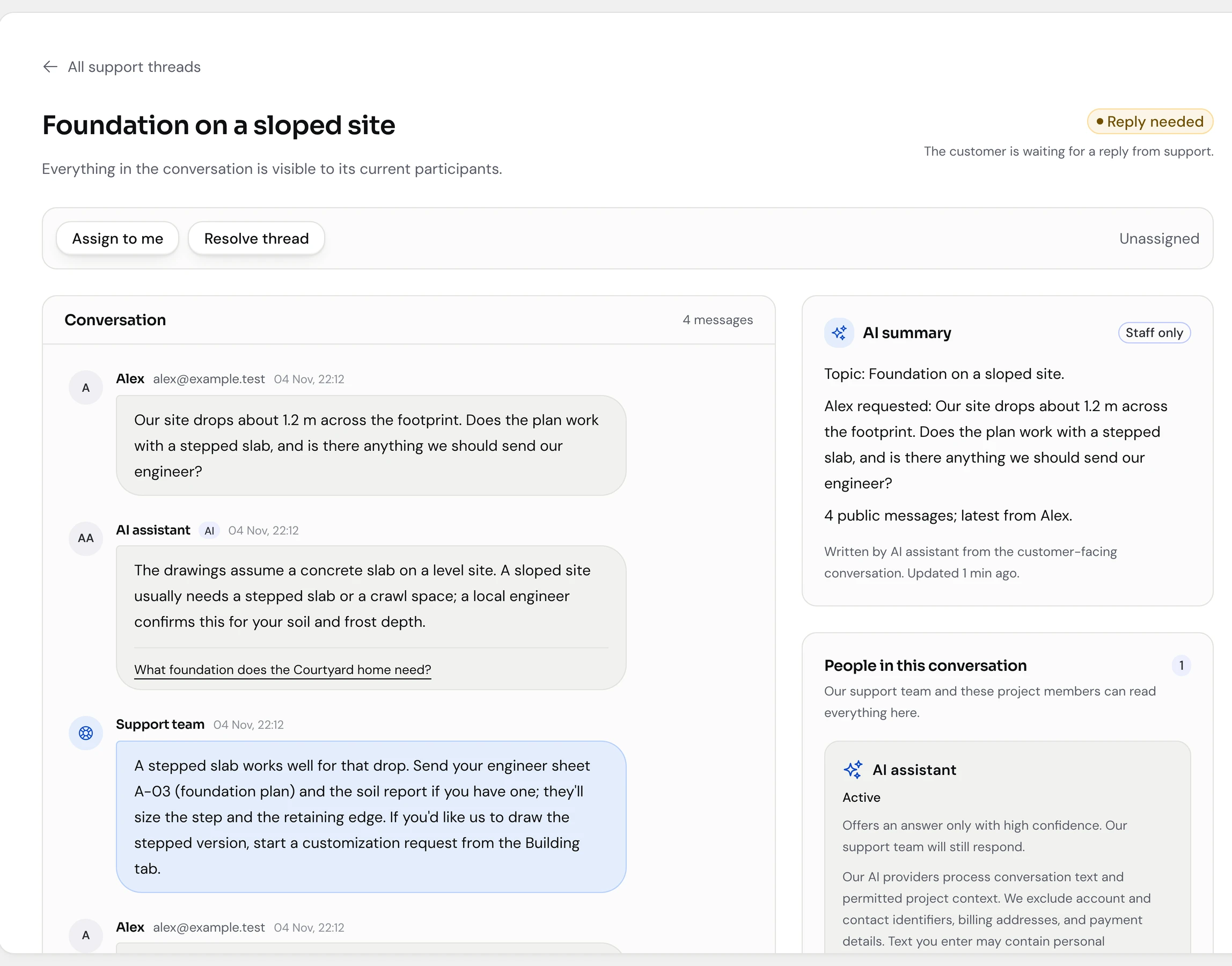
No more “which plan was this about?”. A buyer starts a conversation inside their project and chooses who takes part. Your team sees the files, the purchase and the history right there.

  • One queue, with assignment and an AI summary on every thread
  • Private team notes that never reach the customer or the AI
  • Customers and staff can pause the AI in any conversation
Staff view of a support conversation about a sloped site, with the customer’s question, the staff reply, an AI summary panel and the people in the conversation.
The staff view: conversation, AI summary and context in one place.

Custom plan requests

“Could we move that wall?”

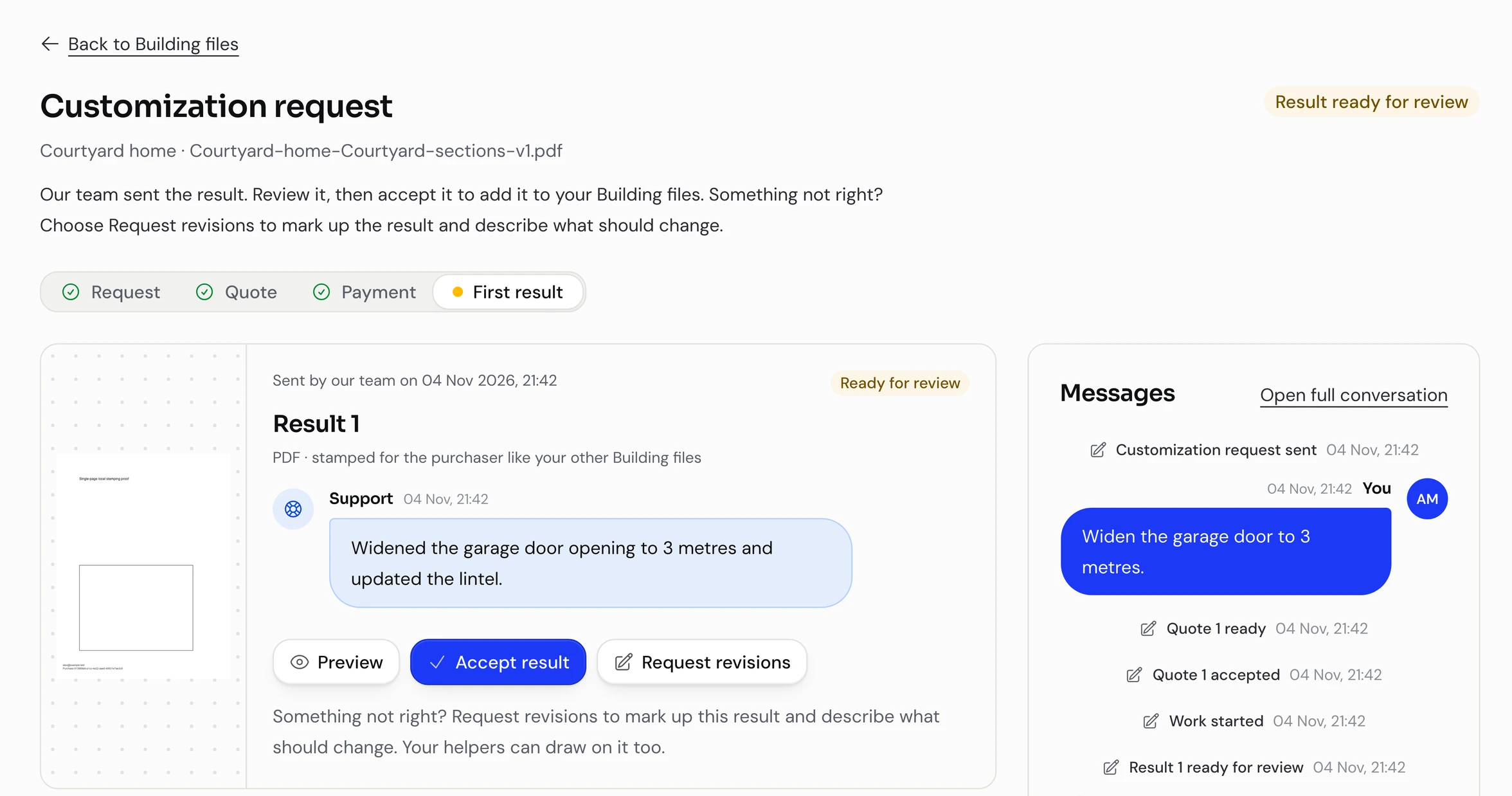
Buyers mark up the PDF and describe the change. Your team quotes, does the design work and uploads the result, stamped like any other file. The buyer accepts it or asks for a revision.

The request, the quote, every revision and the accepted file stay with the project. Even when the wall moves twice.

Payment is arranged outside Unrolled; your team confirms it.

Customization request page showing a result ready for review, with the staff summary of the change, a preview of the stamped PDF and actions to accept it or ask for a revision.
A result to review. Accept it, or ask for a revision.

Prefab homes

Deliver prefab homes, too?

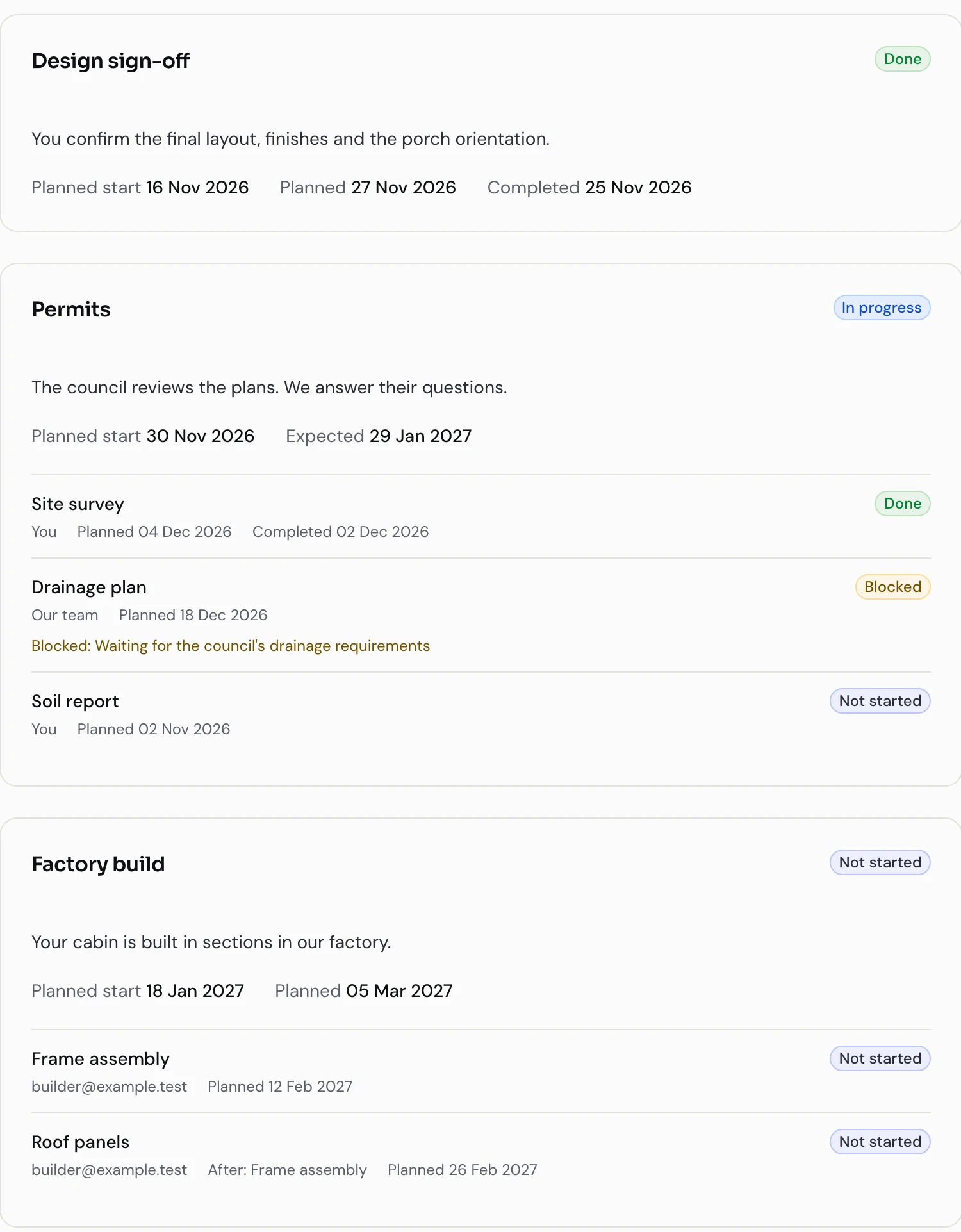
Give each home its own project: a timeline the customer can follow, conversations with your team, and builders and suppliers who see only what you share with them. No plan purchase needed.

  • A timeline proposed by the AI and reviewed by your team before the customer sees it
  • Progress reported in conversation updates the timeline
  • Overdue, blocked and uncertain work lands in one attention queue
See what your team sees
Prefab project timeline with design sign-off completed, permits in progress with a forecast date, tasks with owners, and factory build and delivery milestones to come.
What’s done, what’s next and when. Customer view.
What your team sees

Every proposal from the coordinator, every blocked or overdue task and every unanswered update request waits in one queue. Your team accepts, changes or declines, with a reason on record.

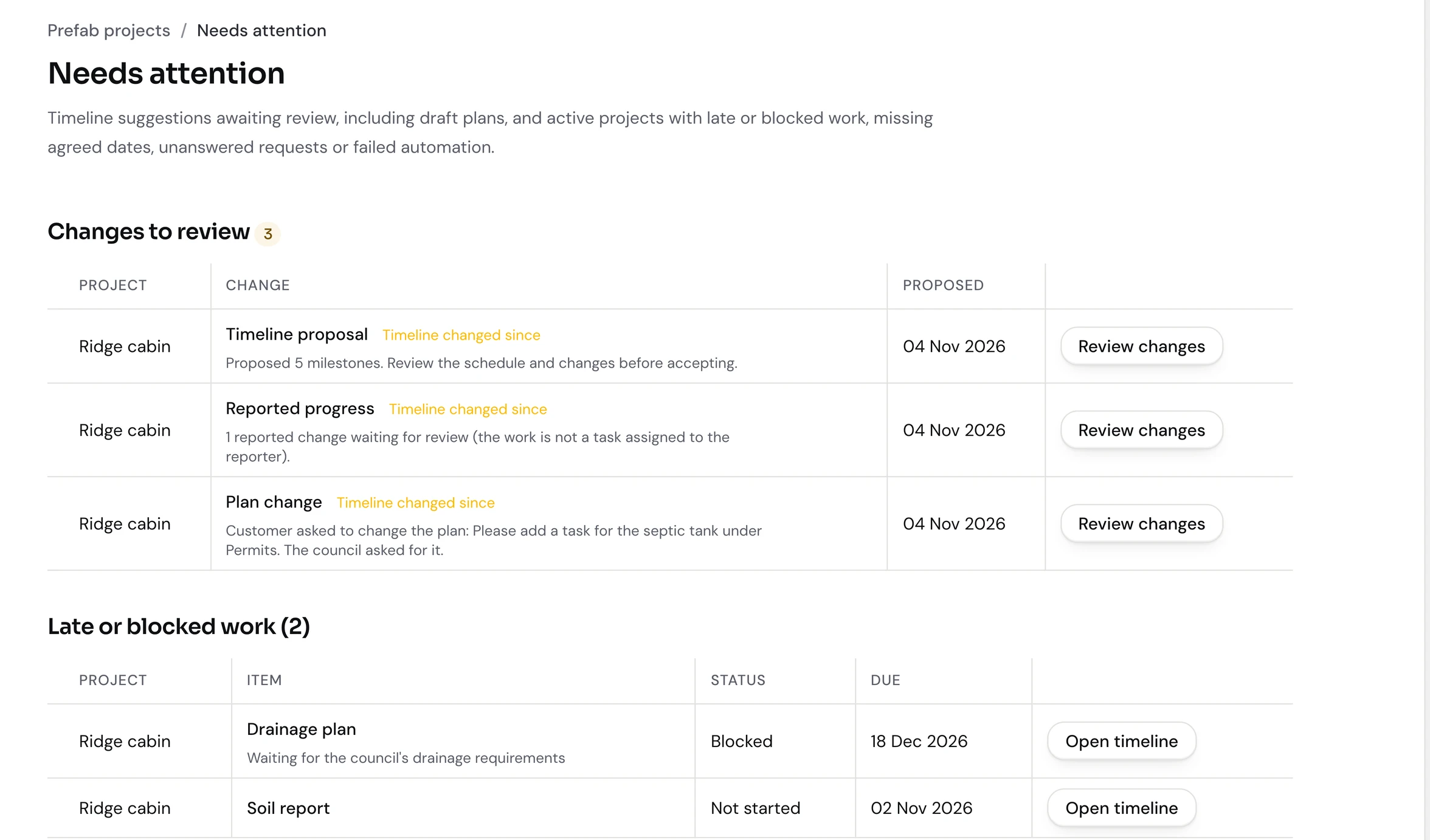
Staff attention queue for prefab projects listing proposals to review, blocked and overdue work and unanswered update requests.
One queue for everything that needs a decision.

Under the hood

Built to be trusted with your buyers.

Unrolled comes from a team that has been building software products for more than 20 years. The parts nobody sees get the same care as the parts everybody does.

Architecture

  • Your own instance and database, never shared with another studio
  • A shared, tested core, with your studio’s workflows on top
  • Work that follows a sale is saved with the sale and retried safely, so it survives a restart

Data safety

  • Every change checks again who is allowed to make it
  • Files are authorised on every preview and download
  • Purchase history is never rewritten
  • An audit trail for staff and customers alike: who changed what and when, from settings and file releases to purchases, invitations, downloads and conversations
  • The AI only sees what the people in a conversation may see
  • Buyers can export their data or close their account

Technology

  • Elixir and Phoenix, on the Erlang runtime built for systems that keep running
  • Ash framework, so business rules and permissions live in one place
  • Sign-in with one-time email codes, so there are no passwords to leak
  • Automated tests for every feature, including tests that access is refused and revoked

Service and pricing

Your own Unrolled. Our job to keep it running.

For studios with an established plan business or a growing delivery operation. We set Unrolled up around your catalog and team, then run the technical side.

You get a dedicated instance and database. Your customers, files and project history are yours.

Have a particular way of doing things?

We tailor delivery flows and features to your operation. Custom work is scoped and priced separately.

Managed service

$2,000–$4,000 / month

Plus a $5,000 setup fee.

  • Hosting and technical maintenance
  • Updates to the latest Unrolled version
  • AI for support, project coordination and sales suggestions, with usage allowances in your proposal
  • Ongoing support for your team

An indicative range. We agree the final scope, usage allowances and any extra costs in your proposal.

Book a demo

Questions

The practical ones.

Anything else, ask us in the walkthrough.

Will this work with our Shopify store?

Yes. Keep your catalog and checkout; Unrolled takes over after the sale. We configure and check the Shopify connection with you during setup. If you sell somewhere else, we scope that connection separately.

Can earlier buyers get updated plans?

Yes. When you publish an update, choose whether eligible earlier purchases receive it or only new ones. Draft edits never change what customers already have, and publishing never restores access that has been revoked.

What gets stamped on the PDFs?

The original purchaser’s email and a purchase reference, on every page. Collaborators get that purchaser’s copy. You approve the placement once; the drawing’s vector content stays intact. Stamping discourages casual sharing; it cannot stop someone copying a file. DWG, ZIP and other non-PDF files are delivered unchanged.

What does the AI do on its own?

When enabled, it answers routine customer questions it can ground in your published FAQ and the project context the conversation’s participants are allowed to see. Replies are labelled and show their source. It also summarises every support thread for your team, drafts replies on request and, on prefab projects, records reported progress and asks for updates. On your projects pages it can suggest similar designs from your catalog, and it writes the personal note in upgrade offers your own rules trigger. Everything else waits for a person.

What does the AI never do?

It never approves refunds, changes a purchase, decides who gets an offer or sets a price, gives design or structural advice beyond your published knowledge, or replies when it isn’t confident. Customers and staff can pause it in any conversation, and your team sends every drafted reply itself.

Can buyers share a project with their builder or family?

Yes. The buyer invites people by email as editors, who can download the stamped files and edit project notes, or viewers, who can only preview. The buyer can change a role or remove someone at any time. Purchase details stay with the buyer, every download carries the buyer’s stamp, and each conversation has its own participants. On prefab projects your team invites builders and suppliers, who see only the tasks shared with them.

How do custom plan requests work?

Buyers mark up a PDF and describe the change; they need the Building package to send it. Your team quotes, confirms payment arranged outside Unrolled, does the design work and uploads the result. The buyer accepts it or asks for a revision. Accepted files join their Building package.

Which of our existing tools could this replace?

PDF delivery and purchaser stamping are built in, along with the customer portal, project conversations, AI summaries and staff drafting. Sales-event capture, retries and recovery tools cover the supported Shopify workflow. We review your current tools together and agree what you can retire.
Next step

Let’s walk through your workflow.

Tell us how you sell and deliver plans today. We’ll walk through a purchase, a plan update and a customer question, and show where the AI helps and where it stays out of the way.

Book a demo

A 60-minute call, booked through Calendly. Prefer email? Write to adam@unrolledhq.com.